
Financial institutions worldwide have standardized on PDF as the primary format for delivering bank statements to customers. This digital format preserves the exact visual appearance of transactions while ensuring compatibility across devices and platforms. Understanding the bank statement format PDF structure has become essential for businesses managing finances, reconciling accounts, and maintaining accurate records for tax compliance and financial planning.
Understanding the PDF Bank Statement Structure
The bank statement format PDF follows a consistent organizational hierarchy that financial institutions use to present account information. Most statements begin with a header section containing the bank's logo, customer identification details, and statement period dates. This top section establishes the document's authenticity and provides immediate context for the data that follows.
Essential Components of Bank Statement PDFs
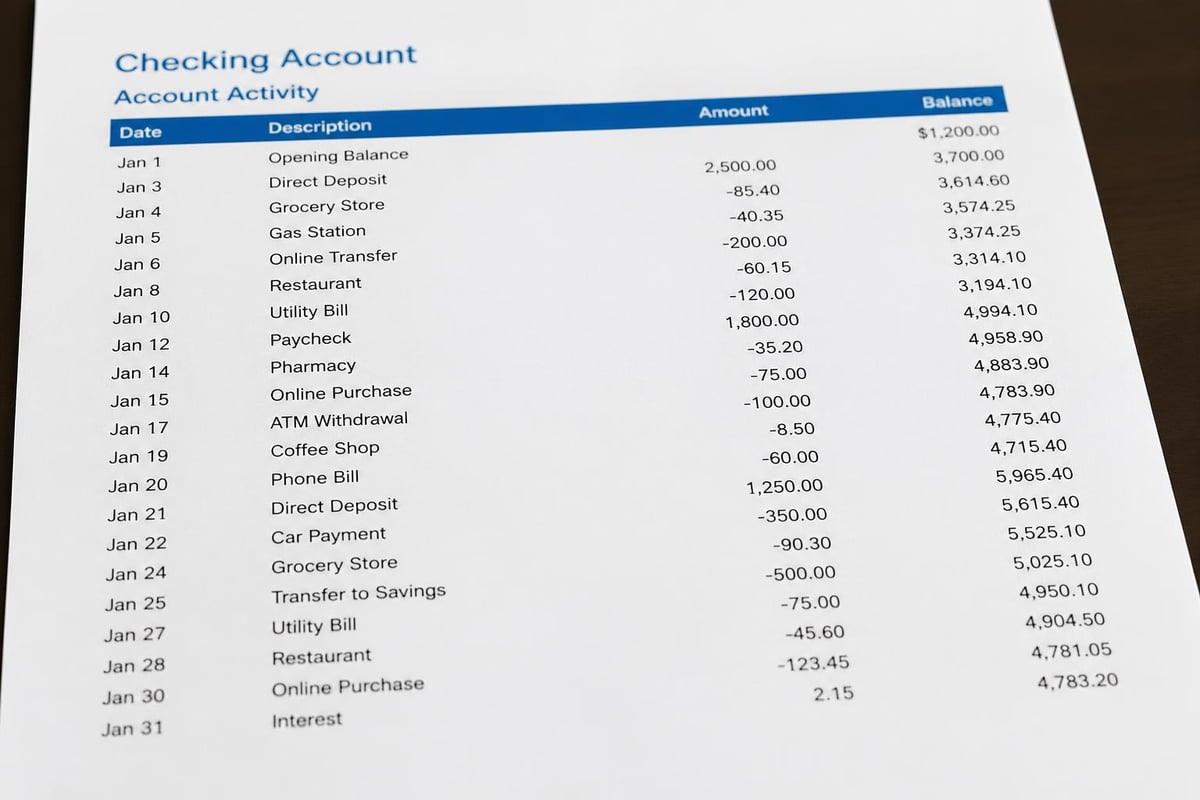
Every properly formatted PDF bank statement contains several critical sections that work together to provide a complete financial picture. The account summary typically appears near the top, displaying opening balance, total deposits, total withdrawals, and closing balance for the statement period.
Key elements include:
- Account holder information with name, address, and account number
- Statement period dates showing the timeframe covered
- Beginning and ending balances for quick reconciliation
- Transaction details organized chronologically with dates, descriptions, and amounts
- Fee disclosures itemizing any charges applied during the period
- Interest calculations for accounts that earn or accrue interest
The transaction section forms the bulk of most bank statement format PDF files. Each entry includes the transaction date, posting date, description, debit or credit indicator, and running balance. This detailed record allows account holders to verify every movement of funds.
Metadata and Security Features
Modern PDF bank statements embed metadata that enhances security and traceability. This hidden information layer includes creation date, modification history, and digital signatures that verify document authenticity. Financial institutions often apply password protection and encryption to common bank statement formats to prevent unauthorized access.
| Security Feature | Purpose | Implementation |
|---|---|---|
| Password Protection | Restrict document access | User must enter code to open file |
| Encryption | Scramble data content | AES-256 or similar algorithms |
| Digital Signatures | Verify authenticity | Cryptographic validation |
| Watermarks | Prevent alteration | Embedded visual markers |
The PDF/A standard, specifically designed for long-term document preservation, ensures that bank statements remain readable decades into the future. This ISO-standardized format maintains visual fidelity regardless of software updates or technology changes.
Why Banks Choose PDF Format
Financial institutions gravitated toward PDF as the standard bank statement format for compelling technical and practical reasons. The format's universal compatibility means customers can open statements on any device without specialized software. Unlike proprietary formats, PDFs maintain consistent appearance across Windows, Mac, iOS, Android, and Linux platforms.
Advantages Over Alternative Formats
When comparing PDF, CSV, and OFX formats, PDFs excel at presenting human-readable financial summaries. The visual layout communicates information quickly through formatting, spacing, and typography that machine-readable formats cannot replicate.
PDFs also provide legal protection for financial institutions. The format's ability to lock content prevents customers from altering transaction details, which protects both parties in disputes. Digital signatures embedded in the bank statement format PDF create an audit trail that proves document authenticity in regulatory examinations or legal proceedings.
The format supports detailed disclosures that banks must provide under federal regulations. Terms and conditions, fee schedules, and privacy notices integrate seamlessly into PDF statements without requiring separate documents. This consolidation simplifies compliance while reducing confusion for account holders.
Common PDF Statement Layouts Across Institutions
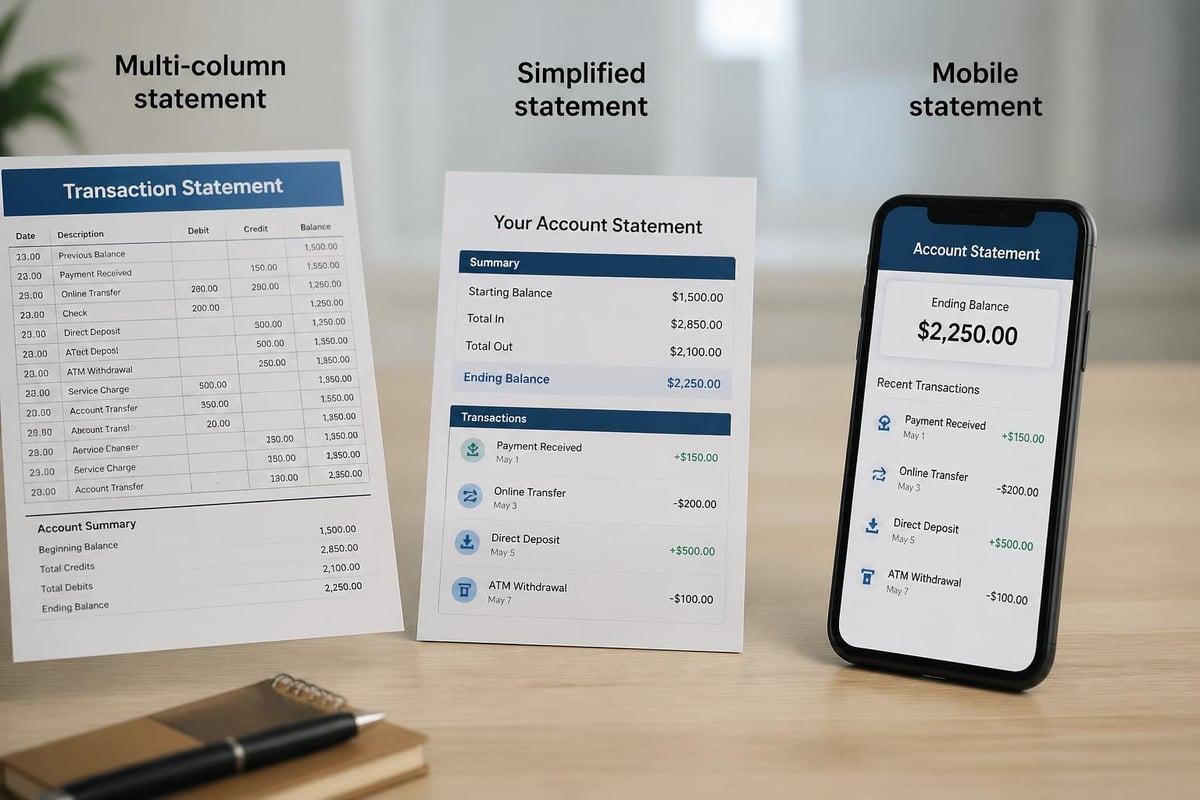
While the bank statement format PDF maintains consistency in core elements, layout variations exist across different financial institutions. Large national banks typically use multi-column designs that maximize information density on each page. Regional credit unions often employ simpler, single-column formats that prioritize readability over space efficiency.
Transaction Table Variations
The transaction listing represents the most variable element in PDF bank statements. Some institutions present transactions in detailed tables with separate columns for date, description, withdrawals, deposits, and balance. Others use a simplified format that combines debits and credits in a single amount column with positive and negative values.
Advanced layouts incorporate visual cues like:
- Color coding to distinguish debits from credits
- Bold text highlighting large transactions
- Category labels grouping similar transaction types
- Running subtotals for deposits and withdrawals
- Check images embedded alongside check transaction entries
Mobile banking has influenced PDF design trends, with many banks now producing statements optimized for smartphone viewing. These responsive designs use larger fonts and simplified layouts that remain legible on smaller screens.
Challenges with PDF Bank Statements
Despite widespread adoption, the bank statement format PDF presents significant obstacles for businesses managing financial data. The format prioritizes visual presentation over data extraction, making it difficult to transfer information into accounting systems. Transactions locked in PDF tables cannot flow directly into spreadsheets without manual retyping or specialized conversion tools.
Data Extraction Difficulties
Copying transaction data from PDFs often produces formatting errors that corrupt numbers and misalign columns. Decimal points shift, dates scramble, and descriptions merge into adjacent fields. These errors create reconciliation nightmares that consume hours of staff time to correct.
The challenge intensifies when dealing with multiple bank accounts. A business receiving statements from three or four institutions faces the tedious task of standardizing different PDF layouts into a unified format. Each bank's unique structure requires separate handling, multiplying the workload.
| Common PDF Extraction Problems | Impact on Workflow | Typical Resolution Time |
|---|---|---|
| Misaligned columns | Incorrect transaction amounts | 15-30 minutes per statement |
| Merged description fields | Lost transaction details | 10-20 minutes per statement |
| Date format inconsistencies | Failed imports to accounting software | 5-15 minutes per statement |
| Special characters in amounts | Formula errors in spreadsheets | 20-40 minutes per statement |
For businesses working with services like Taxt for tax planning, accurate transaction categorization becomes crucial for maximizing deductions and maintaining compliance. Manual data entry from PDFs increases the risk of missed deductions or categorization errors that could trigger audits.
Converting PDF Statements to Usable Formats
Modern businesses require transaction data in formats that integrate with accounting platforms, budgeting tools, and financial analysis software. Converting the bank statement format PDF into structured spreadsheets has become a critical workflow step for finance teams.
Manual Conversion Methods
The simplest approach involves copying data from PDFs and pasting into Excel or Google Sheets. This method works for occasional statements but scales poorly when processing multiple accounts monthly. Each copy-paste operation risks introducing errors that compromise data integrity.
Template-based conversion offers moderate improvement. Creating standardized spreadsheet templates with formulas and formatting allows for more consistent data entry. However, this approach still requires manual review to catch formatting discrepancies and ensure accuracy.
Automated Conversion Solutions
AI-powered conversion services analyze PDF structure and extract transaction data with minimal human intervention. These tools recognize table boundaries, identify column headers, and map data to appropriate fields. Services that convert PDF bank statements to usable spreadsheets handle the complexity of varying bank formats while maintaining accuracy rates above 99 percent.
Advanced conversion platforms address common extraction challenges:
- Column detection that identifies transaction elements regardless of spacing
- Date normalization converting various formats to consistent standards
- Amount parsing handling currency symbols and negative number formats
- Description cleaning removing extraneous characters and standardizing text
- Balance verification cross-checking ending balances against transaction totals
The conversion process transforms locked PDF data into flexible spreadsheet formats compatible with QuickBooks, Xero, FreshBooks, and other accounting platforms. This compatibility eliminates double-entry between systems and reduces reconciliation time from hours to minutes.

Security Considerations for PDF Statements
Financial data sensitivity demands robust security measures throughout the bank statement format PDF lifecycle. From generation by the bank through download, storage, and eventual disposal, each step presents potential vulnerability points that require protection.
Download and Storage Best Practices
Accessing statements through secure bank portals using encrypted HTTPS connections prevents interception during transmission. Two-factor authentication adds an essential verification layer that blocks unauthorized account access even with compromised passwords. Following guidance on downloading PDF bank statements securely helps maintain data integrity from source.
Storing PDF statements on password-protected devices with full-disk encryption protects against physical theft. Cloud storage services offer convenience but require careful configuration to ensure proper access controls and encryption standards. Business-grade solutions provide audit logs that track who accessed which statements and when.
For businesses consulting with Brookwood Investment Group or similar financial advisors, secure statement sharing becomes paramount. Using encrypted file transfer methods rather than email attachments prevents exposure of sensitive financial details to network monitoring or email server breaches.
When working with checking statements that contain personally identifiable information, compliance with data protection regulations like GDPR or CCPA may apply. Proper handling includes limiting access to authorized personnel and implementing retention policies that delete old statements after required holding periods expire.
PDF Statement Formats Across Banking Systems
International banking standards influence how different institutions structure their bank statement format PDF files. American banks typically follow Federal Reserve guidelines that specify minimum required disclosures and formatting standards. European banks adhere to SEPA regulations that mandate specific data elements for cross-border transactions.
Domestic vs. International Format Differences
United States bank statements emphasize check numbers and ACH transaction codes that reflect the domestic payment infrastructure. International statements often include SWIFT codes, IBAN numbers, and currency conversion details absent from purely domestic accounts.
The presentation of fees varies significantly across regions. US statements typically itemize each fee type with separate line items, while some international formats aggregate charges into monthly totals. This difference impacts how businesses analyze fee structures and negotiate better banking terms.
Transaction descriptions follow country-specific conventions. American banks use merchant category codes and standardized descriptors. European banks may include additional reference numbers required for VAT reporting. Asian financial institutions often provide dual-language descriptions in local languages and English.
Enhancing PDF Statement Functionality
While the basic bank statement format PDF serves its primary purpose of information delivery, enhanced versions incorporate features that improve usability. Interactive PDFs allow account holders to click transaction categories and jump to detailed breakdowns. Bookmarks enable quick navigation to specific sections without scrolling through multi-page documents.
Searchable Text and Accessibility
Optical character recognition (OCR) technology converts scanned images into searchable text layers. This enhancement allows users to locate specific merchants, amounts, or dates using PDF reader search functions. The bank statement analyzer capabilities improve dramatically when working with searchable PDFs compared to image-only files.
Accessibility features make PDFs usable for individuals with visual impairments. Tagged PDF structures enable screen readers to interpret document hierarchy and read content in logical order. Alternative text descriptions for images and charts ensure that all information remains accessible regardless of disability.
| Enhancement Feature | Benefit | Typical File Size Impact |
|---|---|---|
| Searchable text layer | Quick transaction lookup | +5-10% larger |
| Interactive bookmarks | Faster section navigation | +1-2% larger |
| Embedded hyperlinks | Direct access to resources | Negligible |
| Form fields | Digital annotation capability | +3-5% larger |
| Accessibility tags | Screen reader compatibility | +8-12% larger |
Some progressive banks now include clickable links within PDF statements that connect to online banking features. A suspicious transaction might link directly to the fraud reporting interface. Interest rate disclosures might connect to savings account opening pages. These interactive elements transform passive statements into engagement tools.
Regulatory Compliance and PDF Statements
Financial regulations mandate specific content and format requirements for bank statements regardless of delivery method. The Truth in Savings Act requires clear disclosure of interest rates, fees, and account terms. Regulation E governs electronic fund transfer notifications that must appear on statements.
Required Disclosures and Legal Elements
The bank statement format PDF must include contact information for dispute resolution and error reporting. Federal law requires this information to appear prominently so customers can quickly address unauthorized transactions or banking errors. Time limits for disputing charges must be clearly stated with specific reference to applicable regulations.
Privacy notices explaining how financial institutions share customer data appear on periodic statements. While many banks provide annual standalone privacy disclosures, abbreviated reminders in monthly PDFs reinforce data protection practices. These sections typically reference the bank's privacy policy available online with instructions for opting out of information sharing where permitted by law.
For businesses engaged in lending activities, statements must reflect compliance with Fair Credit Reporting Act requirements. When negative information might be reported to credit bureaus, statements must notify customers of this possibility. This disclosure protects both the institution and the borrower by establishing clear communication about credit reporting practices.
Tax reporting obligations intersect with statement production. Year-end summaries included in December PDF statements aggregate interest income, fees paid, and other tax-reportable items. These totals must match the amounts reported on 1099-INT and other tax forms the bank submits to the IRS, ensuring consistency across documentation.
Future Developments in Statement Technology
The bank statement format PDF continues evolving as technology advances and customer expectations shift. Artificial intelligence and machine learning now power automated categorization that tags transactions by type without manual intervention. These smart statements recognize patterns and apply consistent labels across all spending.
Emerging Trends and Innovations
Real-time statement generation represents a significant departure from monthly cycles. Some financial technology companies now produce on-demand PDFs reflecting current account status at any moment. This immediate access helps businesses maintain up-to-date financial records without waiting for period-end processing.
Blockchain integration promises enhanced verification for digital statements. Immutable ledgers could timestamp each transaction and create unforgeable audit trails. While still experimental, blockchain-backed statements may eventually replace traditional digital signatures as the gold standard for document authentication.
Environmental considerations drive interest in reducing statement file sizes without sacrificing content. Advanced compression algorithms and efficient font embedding techniques shrink PDF dimensions while maintaining visual quality. Smaller files reduce storage costs and transmission times, particularly for businesses managing hundreds of historical statements.
Integration with financial wellness platforms transforms statements from passive records into active planning tools. PDFs embedded with smart analytics might highlight spending trends, identify potential savings opportunities, or flag unusual activity patterns. These enhanced statements blur the line between reporting and advisory services.
Understanding the bank statement format PDF structure empowers businesses to manage financial data more effectively and make informed decisions about their accounting workflows. Whether handling statements manually or seeking automated solutions, recognizing the format's strengths and limitations guides better process design. Bank Statement Boss solves the fundamental challenge of converting locked PDF data into flexible spreadsheet formats with AI-powered accuracy, transforming hours of manual data entry into minutes of automated processing with bank-level security protecting your sensitive financial information throughout the conversion process.