

Every bookkeeper, accountant, and small business owner eventually hits the same wall: a client or bank hands over a stack of PDF statements, and the numbers inside are essentially frozen. You can read them, but you can't sort, filter, or import them anywhere without retyping every line. That single friction point is why so many finance professionals are searching for a reliable tool to extract transactions from PDF statement files instead of continuing to copy numbers by hand.
The good news is that this problem has largely been solved — but not every solution is created equal. Some methods are free but painfully slow. Others promise automation but produce messy, error-riddled spreadsheets that need just as much cleanup as manual entry. This article breaks down the real options available in 2026, compares their accuracy and speed, and explains why AI-powered extraction has become the standard for anyone who values their time.
Why Extracting Transactions from PDFs Is Harder Than It Looks
Bank statements are designed for human readability, not data portability. Each institution uses its own layout, column order, date format, and font structure. A PDF might be a native digital file, or it might be a scanned image with no embedded text at all. This inconsistency is exactly why generic tools often fail.
Common obstacles include:
- Multi-column layouts that confuse simple text extraction, merging dates with descriptions or amounts.
- Scanned or photographed statements that require optical character recognition (OCR) rather than straightforward text parsing.
- Inconsistent formatting across pages, especially when statements span multiple months or accounts.
- Rounding and currency symbols that get misread as text characters, corrupting numeric values.
- Password-protected or encrypted PDFs that block extraction tools entirely until unlocked.
Understanding these challenges explains why a purpose-built converter consistently outperforms generic PDF tools or spreadsheet formulas. The IRS record-keeping guidelines require businesses to maintain accurate financial records, which makes clean transaction data non-negotiable, not just convenient.
The Three Main Approaches to Extraction
Before comparing specific products, it helps to understand the three broad categories of tools available today.
1. Manual Data Entry
The oldest method: someone opens the PDF, reads each line, and types it into a spreadsheet. It requires no software investment but scales terribly. A single 40-transaction statement might take 20-30 minutes to transcribe accurately, and errors creep in with fatigue, especially during month-end crunches.
2. Generic OCR and PDF-to-Excel Converters
These tools convert PDF text into editable formats but don't understand financial structure. They treat a bank statement the same way they'd treat a resume or a contract — as generic text and tables. The result is often a jumbled spreadsheet requiring significant manual cleanup, particularly around date columns, split transactions, and running balances.
3. AI-Powered Financial Document Converters
Purpose-built platforms like Bank Statement Boss are trained specifically on financial documents. They recognize transaction patterns, categorize debits and credits, and reconstruct statements into clean, structured spreadsheets ready for import into accounting software. This category has matured rapidly, and as of 2026 it's the clear choice for anyone processing statements regularly.
Comparing the Options Side by Side
| Method | Speed | Accuracy | Best For | Learning Curve |
|---|---|---|---|---|
| Manual Entry | Very slow (20-40 min/statement) | Variable, prone to fatigue errors | One-off, single-page statements | None |
| Generic OCR Tools | Moderate | Inconsistent with complex layouts | Simple, single-column PDFs | Low-Moderate |
| AI-Powered Converters (e.g., Bank Statement Boss) | Fast (seconds to minutes) | High, with built-in validation | Recurring bulk processing, bookkeeping firms | Low |
This comparison highlights a pattern seen across the accounting software space: tools that understand financial document structure — not just generic text — consistently deliver better accuracy with less manual correction.
What to Look For in a PDF Transaction Extraction Tool
Not all extraction tools serve the same use case, so it's worth defining criteria before choosing one. Based on feedback from bookkeeping professionals and finance teams, these are the features that matter most:
- Accuracy on real-world statements. Test the tool with a genuinely messy statement, not a clean sample PDF.
- Support for multiple bank formats. Different banks structure statements differently, and a good tool should handle major U.S., UK, and international formats.
- Export compatibility. Output should map cleanly into QuickBooks, Xero, or Sage, not just a generic CSV that needs reformatting.
- Security and data handling. Financial documents are sensitive; look for encryption in transit and at rest, plus a clear data retention policy.
- Bulk processing capability. If you're handling multiple clients, the ability to upload and convert several statements at once saves significant time.
- API access. For firms building internal workflows, API-level integration removes the need for manual uploads altogether.
- Categorization features. Automatic tagging of transaction types (payroll, utilities, vendor payments) speeds up reconciliation.
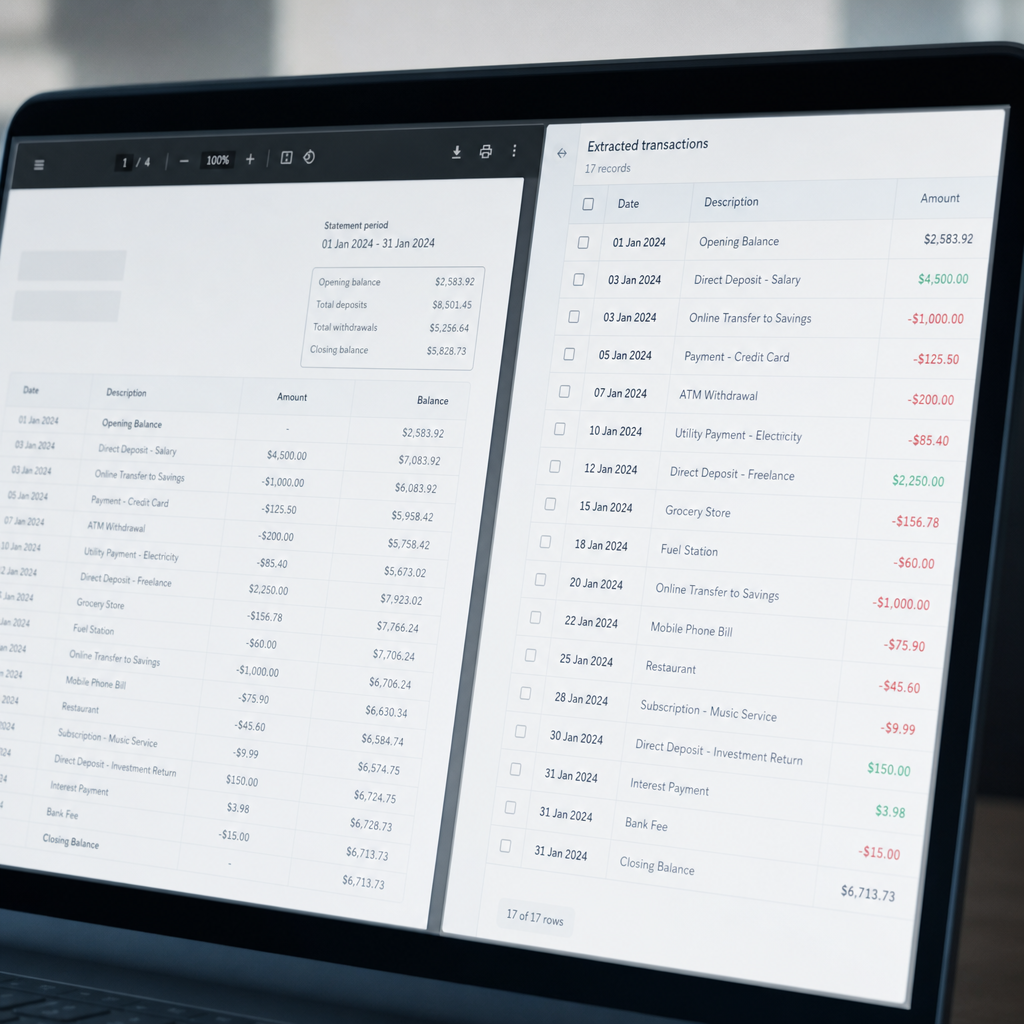
How AI-Powered Conversion Actually Works
It's worth demystifying the technology, because "AI-powered" gets used loosely in marketing. In legitimate financial document converters, the process typically involves several layered steps:
- Document classification — the tool identifies which bank or institution issued the statement based on layout cues.
- Text and table extraction — using a combination of OCR (for scanned documents) and native PDF parsing (for digital documents).
- Machine learning models trained on transaction structures recognize dates, descriptions, debits, credits, and running balances even when column order varies.
- Validation checks cross-reference extracted totals against the statement's printed summary to catch parsing errors before the file is delivered.
- Formatting and export — converting the cleaned data into a spreadsheet structure aligned with accounting software import requirements.
This is a meaningfully different process than a basic "PDF to Excel" converter that simply detects gridlines and pastes text into cells without any financial context. The American Institute of CPAs has increasingly highlighted automation and data accuracy as core competencies for modern accounting practices, reflecting how central this workflow has become to the profession.
Real-World Use Cases Across Different Roles
Different professionals rely on transaction extraction for different reasons, and it's useful to see how the same core need plays out across roles.
Freelance bookkeepers managing multiple small business clients often receive a folder of statements at month-end. Manually entering all of them isn't sustainable once a bookkeeper has more than a handful of clients. A bulk-upload tool that processes dozens of PDFs into a single reconciled spreadsheet turns a multi-day task into an afternoon.
Small business owners who don't have dedicated accounting staff often just need their bank data in a format they can hand to a CPA or import into their own software. For them, ease of use and clean formatting matter more than advanced features like API access.
Finance teams at growing companies frequently deal with several bank accounts and credit cards across departments. Consolidating all of that into one standardized format for internal reporting or audit purposes requires both accuracy and consistency across statement types.
Accounting firms processing statements for many clients benefit most from API access, allowing them to build the conversion step directly into their existing practice management software rather than uploading files manually each time.
Table: Matching Tool Type to User Need
| User Type | Primary Need | Recommended Approach |
|---|---|---|
| Solo freelancer, occasional use | Simplicity, low cost | AI converter with pay-per-use or low-tier plan |
| Bookkeeper with multiple clients | Bulk processing, accounting software export | AI converter with batch upload and QuickBooks/Xero formatting |
| Small business owner | Fast, one-time conversion | AI converter with simple drag-and-drop interface |
| Enterprise finance team | Scale, integration, security | AI converter with API access and audit-ready data handling |
Security Considerations You Shouldn't Skip
Bank statements contain sensitive personal and financial information, including account numbers, balances, and transaction histories. Before uploading statements to any tool, verify:
- The provider uses encryption in transit (TLS/SSL) and encryption at rest for stored files.
- There's a clear data retention policy — ideally files are deleted after processing rather than stored indefinitely.
- The company doesn't sell or share data with third parties for marketing or other purposes.
- Compliance with relevant standards, such as SOC 2 or similar frameworks, is documented or available on request.
The Federal Trade Commission publishes general guidance on data security practices that's useful context when evaluating any SaaS tool handling financial documents. Bank Statement Boss addresses this directly by building secure data handling into its core architecture, which matters significantly for accountants who have a fiduciary responsibility to protect client information.

Step-by-Step: Extracting Transactions Efficiently
For teams evaluating a new workflow, here's a practical sequence that applies to most AI-powered converters, including Bank Statement Boss:
- Gather all PDF statements for the period you're reconciling, organizing by account or client if handling multiple sources.
- Upload files to the converter, using bulk upload if the platform supports it.
- Review the automatic classification to confirm the tool correctly identified the bank and statement type.
- Export in your preferred format — CSV, Excel, or a format pre-mapped for QuickBooks, Xero, or Sage.
- Spot-check totals against the original PDF's summary page to confirm accuracy before importing into your accounting system.
- Import into your accounting software, applying any existing categorization rules you've set up.
- Archive the original PDFs according to your firm's retention policy, typically alongside the converted spreadsheet for audit trail purposes.
This workflow typically takes minutes rather than hours once set up, and it scales linearly — processing ten statements takes only marginally longer than processing one, unlike manual entry where time scales directly with volume.
Common Mistakes When Choosing an Extraction Tool
Even experienced finance professionals make avoidable errors when selecting a conversion tool:
- Testing only with clean sample PDFs. Always test with your messiest, most realistic statement — the one with handwritten notes scanned in, or an unusual column layout.
- Ignoring export format compatibility. A tool that produces a generic CSV might still require significant reformatting before it imports cleanly into QuickBooks or Xero.
- Overlooking bulk processing limits. Some tools cap the number of pages or files per upload, which becomes a bottleneck during busy periods like tax season.
- Skipping the security review. Given the sensitivity of financial data, this should never be an afterthought.
- Assuming all AI tools perform equally. The underlying models and training data vary significantly between providers, leading to real differences in accuracy.
Why Bank Statement Boss Stands Out
Among the AI-powered options available, Bank Statement Boss is built specifically around the workflow accountants and small business owners actually need — not a generic document tool retrofitted for finance. Key differentiators include:
- Direct compatibility with QuickBooks, Xero, and Sage formatting, reducing the manual cleanup step that plagues generic converters.
- Bulk processing for firms managing multiple clients or accounts simultaneously.
- Secure data handling, addressing the legitimate security concerns around uploading sensitive financial documents.
- API access on higher-tier plans, allowing firms to integrate extraction directly into existing practice management or accounting workflows.
- Consistent accuracy across a wide range of bank formats, reducing the need for spot-checking every single transaction.
For a freelance bookkeeper juggling a dozen clients, or a finance team consolidating statements across several business accounts, this kind of purpose-built accuracy translates directly into hours saved every month — time that can go toward advisory work or higher-value client service instead of data transcription.
Final Thoughts
Choosing the right tool to extract transactions from PDF statement files isn't just a matter of convenience — it directly affects accuracy, compliance, and how much time your team spends on repetitive data entry versus higher-value work. Manual entry doesn't scale, generic OCR tools often create more cleanup work than they save, and not every "AI-powered" tool delivers on its promise.
For finance professionals who need consistent, accurate, and secure conversion, Bank Statement Boss offers a purpose-built solution designed around the real formatting requirements of QuickBooks, Xero, and Sage. Instead of retyping numbers or fighting with misaligned spreadsheets, you can upload a statement and get back structured, ready-to-use data in minutes — freeing up time for the work that actually requires human judgment.
Article written by FrontRank