

Every bookkeeper, accountant, and small business owner eventually faces the same tedious task: turning a stack of PDF bank statements into usable transaction data. Whether you're reconciling accounts, preparing taxes, or building a cash flow forecast, you need clean rows of dates, descriptions, and amounts — not a scanned document you have to read line by line. The question is no longer whether to digitize statements, but how to do it efficiently, accurately, and securely.
This article compares the three main approaches to extracting transactions from bank statements — manual entry, traditional OCR software, and modern AI-powered converters — so you can choose the method that fits your workload, budget, and accuracy requirements.
Why Extracting Transactions from Bank Statements Is Harder Than It Looks
Bank statements are designed for human readability, not machine parsing. Every financial institution formats its PDFs differently: column widths vary, some statements split transactions across two pages, and many include decorative headers, logos, and disclaimers that confuse automated readers. Add in multi-page statements covering a full year, and the manual workload multiplies quickly.
Common challenges include:
- Inconsistent layouts across banks and even across statement types from the same bank (checking vs. credit card vs. savings)
- Scanned or image-based PDFs that contain no selectable text at all
- Merged or split transaction lines where a single transaction wraps across two rows
- Rounding and currency formatting differences, especially for businesses operating internationally
- Security concerns when uploading sensitive financial documents to third-party tools
According to the Consumer Financial Protection Bureau, financial institutions are not required to standardize statement formats, which is part of why no single parsing template works for every bank. This lack of standardization is precisely why so many bookkeepers still default to manual copy-paste work — and why that approach breaks down fast as client volume grows.
Method 1: Manual Data Entry
Manual entry means opening each PDF, reading every line, and typing transaction data into a spreadsheet by hand. It's the oldest method and, for many small firms, still the default.
Pros:
- No software cost
- Full control over formatting
- Works for any statement, regardless of layout
Cons:
- Extremely time-consuming — a single 20-page statement can take 45–90 minutes to transcribe accurately
- High risk of transposition errors, especially with long numeric strings
- Does not scale beyond a handful of clients
- Repetitive strain on staff doing high-volume data entry
A National Institutes of Health study on data entry error rates found that manual transcription error rates typically range between 1% and 4%, even among trained professionals. In accounting, where a single misplaced decimal can throw off a reconciliation, that margin is too risky for growing practices.
Method 2: Traditional OCR Software
Optical Character Recognition (OCR) tools scan a PDF image and attempt to recognize characters, converting them into editable text. Tools like Adobe Acrobat's export feature or open-source OCR engines fall into this category.
Pros:
- Faster than fully manual entry
- Widely available, often bundled with PDF editors
- Reasonable accuracy on clean, text-based PDFs
Cons:
- Struggles significantly with scanned or low-resolution statements
- Often misreads tables, merging columns or losing alignment
- Requires substantial manual cleanup afterward
- Rarely understands financial context — it can't distinguish a running balance column from a transaction amount column
OCR represented a major step forward from pure manual work, but it treats a bank statement like a wall of text rather than a structured financial document. That distinction matters enormously when the output needs to feed directly into accounting software.
Method 3: AI-Powered Statement Extraction
AI-driven converters go a step further than OCR by applying machine learning models trained specifically on financial documents. Rather than just recognizing characters, these tools understand statement structure — identifying transaction tables, separating dates from descriptions from amounts, and recognizing debit versus credit columns regardless of the bank's layout.
This is the approach used by Bank Statement Boss, which converts PDF bank and credit card statements into structured spreadsheets formatted for direct import into QuickBooks, Xero, and Sage. Because the underlying model has been trained across thousands of statement formats, it adapts automatically to different banks without requiring manual templates.
Pros:
- Handles varied layouts from hundreds of banks automatically
- Dramatically reduces processing time — often seconds per statement
- Higher accuracy on both digital and scanned PDFs
- Outputs ready-to-use spreadsheets formatted for accounting platforms
- API access available for firms that want to automate bulk processing
Cons:
- Requires a subscription for high-volume use
- Best results depend on reasonably legible source documents
- Some advanced features (API, bulk upload) may be reserved for higher-tier plans
Comparing the Three Methods Side by Side
| Factor | Manual Entry | Traditional OCR | AI-Powered Extraction |
|---|---|---|---|
| Speed (per 20-page statement) | 45–90 minutes | 15–30 minutes | Under 2 minutes |
| Typical accuracy | 96–99% | 90–97% | 98–99.5% |
| Handles scanned PDFs | Yes, slowly | Poorly | Yes |
| Learns multiple bank formats | N/A (human judgment) | No, needs templates | Yes, automatically |
| Accounting software compatibility | Manual formatting required | Manual formatting required | Built-in (QuickBooks, Xero, Sage) |
| Scales for high client volume | No | Limited | Yes |
| Upfront cost | Low (labor cost only) | Low–Medium | Subscription-based |
As the table shows, the time savings alone make AI extraction compelling for anyone processing more than a handful of statements per month. For a bookkeeper handling 15–20 clients, the difference between 60 minutes and 2 minutes per statement translates into dozens of reclaimed hours every month.
Step-by-Step: How to Extract Transactions Using an AI Tool
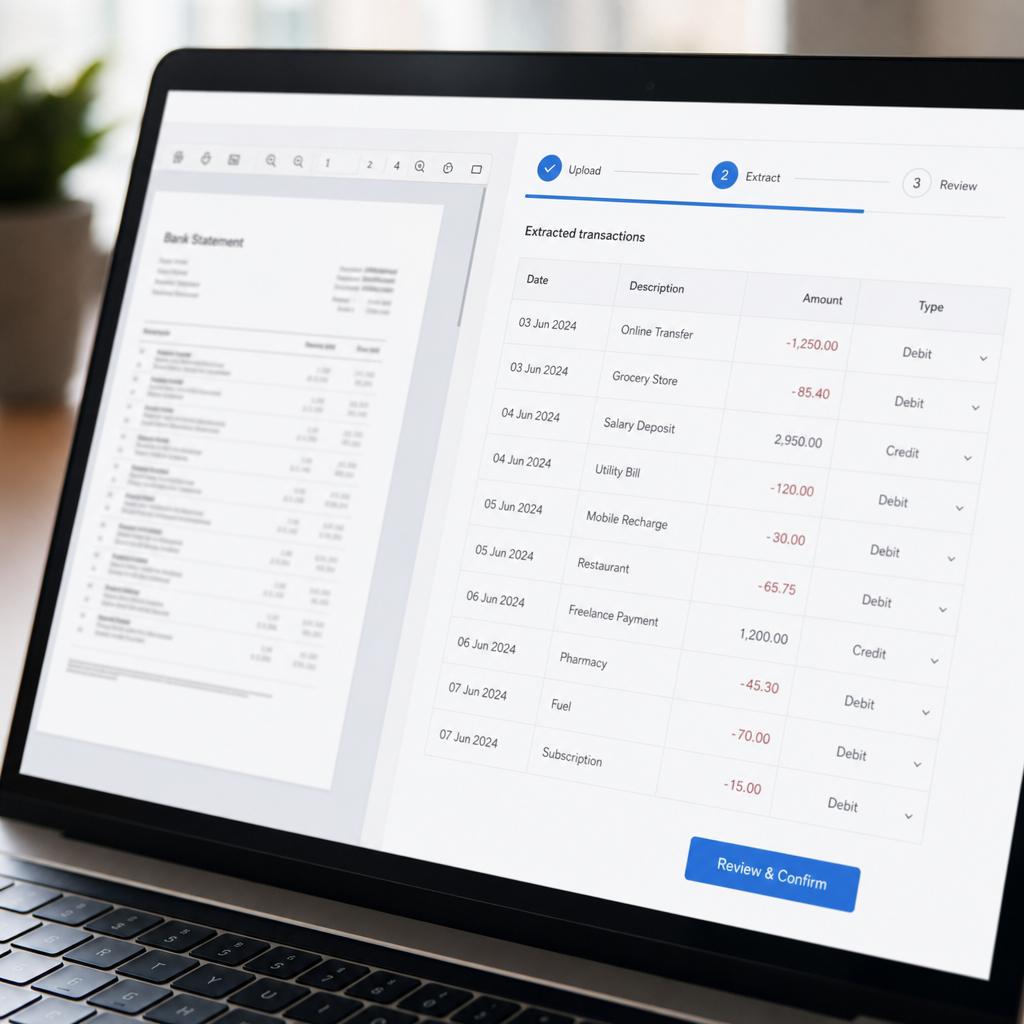
If you're moving away from manual entry or basic OCR, here's a practical workflow for extracting transactions efficiently and accurately.
- Gather your statements. Collect PDF statements from each client or account, ideally in their original downloaded format rather than a photocopy or screenshot.
- Check for password protection. Many bank PDFs are encrypted; remove passwords before uploading, or confirm the tool supports protected files securely.
- Upload to your extraction tool. Platforms like Bank Statement Boss allow batch uploads, so you can process multiple months or multiple accounts at once.
- Select your output format. Choose a spreadsheet format pre-mapped to your accounting platform — for example, a CSV structured for QuickBooks' import fields or Xero's bank feed format.
- Review the extracted data. Even the best AI tools benefit from a quick human review pass, especially for unusual transaction descriptions or foreign currency entries.
- Import directly into your accounting software. With correctly formatted output, this step should take seconds rather than requiring manual remapping of columns.
- Archive the original PDF and the structured file. Keeping both supports audit trails and simplifies future reconciliation.
This workflow typically takes a fraction of the time required by manual transcription, while producing a more consistent, audit-ready output.
Accuracy and Security Considerations
Speed matters, but accuracy and data security matter more when you're handling client financial information. Before adopting any extraction tool, evaluate it against these criteria:
- Encryption in transit and at rest. Confirm the provider uses standard encryption protocols, similar to guidance published by the National Institute of Standards and Technology for handling sensitive data.
- Data retention policy. Does the tool delete your files after processing, or retain them indefinitely? Shorter retention windows generally mean lower risk exposure.
- Compliance posture. Look for SOC 2 or similar attestations, particularly if you handle statements for regulated clients.
- Error-checking features. Tools that flag low-confidence extractions (e.g., blurry scans or unusual formatting) allow you to catch errors before they reach your books.
- Audit trail support. The ability to retain both the original PDF and converted spreadsheet supports compliance reviews and client disputes.
A useful comparison point is how different extraction methods handle these risk factors in practice:
| Risk Factor | Manual Entry | OCR Software | AI Extraction (e.g. Bank Statement Boss) |
|---|---|---|---|
| Human transcription error | High | Medium | Low |
| File security during processing | Depends on local storage | Depends on software/vendor | Encrypted upload/processing |
| Consistency across formats | Variable by staff member | Variable by template | Standardized output |
| Suitable for high-volume client work | No | Limited | Yes |
Firms that handle dozens of client accounts each month should weigh these risk factors as heavily as raw speed. An extraction error that slips into a client's books can cost far more in correction time than it ever saved in data entry.
Choosing the Right Approach for Your Workload
Not every business needs the same solution. Here's a quick framework for matching extraction method to use case:
- Solo freelancer with 1–2 clients and occasional statements: Manual entry or basic OCR may still be workable, though error-checking is essential.
- Freelance bookkeeper managing 5–15 clients monthly: An AI-powered converter typically pays for itself within the first month through time saved alone.
- Small accounting firm processing high statement volume: Bulk upload and API access become critical — look for a tool offering both, along with export formats matched to your accounting stack.
- Finance teams integrating with internal systems: API-level access allows statement data to flow directly into internal reporting tools without manual spreadsheet handoffs, a capability platforms like Bank Statement Boss offer on higher-tier plans.
For context on scaling operational workflows efficiently, resources like leadmailbox.com offer useful perspective on automating repetitive business processes beyond just document conversion — a mindset worth applying across your entire back-office stack, not just statement processing.

Common Mistakes to Avoid When Extracting Transaction Data
Even with the right tool, certain habits undermine accuracy and efficiency:
- Skipping the review step entirely. Automation reduces errors but doesn't eliminate the need for a final accuracy check, especially on unusual transactions.
- Mixing statement types in one batch. Checking account and credit card statements often have different column structures; processing them separately reduces confusion.
- Ignoring currency and date formats. International clients may use DD/MM/YYYY instead of MM/DD/YYYY — confirm your tool handles regional formatting correctly.
- Failing to match output fields to your accounting software's import requirements. A spreadsheet that "looks right" can still fail to import if column headers don't match expected fields in QuickBooks or Xero.
- Not archiving source documents. Always retain the original PDF alongside the converted file for audit and dispute resolution purposes.
Avoiding these pitfalls is often the difference between a smooth monthly close and hours of frustrating cleanup work.
Why This Matters for Growing Practices
As client rosters grow, the cost of inefficient statement processing compounds. A firm handling 10 clients might tolerate an hour of manual work per statement, but at 50 or 100 clients, that same approach becomes operationally unsustainable. According to the U.S. Small Business Administration, administrative overhead is consistently cited by small firms as one of the top constraints on growth — and document processing is a textbook example of overhead that can be automated without sacrificing quality.
Choosing a method that scales — rather than one that merely works for today's volume — positions bookkeeping and accounting practices to take on more clients without proportionally increasing headcount. This is precisely the gap that AI-powered tools are built to close, turning a labor-intensive bottleneck into a fast, repeatable process.
Final Thoughts
Extracting transactions from bank statements doesn't have to mean hours of manual transcription or wrestling with clunky OCR output. Manual entry still has a place for very low-volume, occasional needs, and OCR tools offer a modest improvement, but neither scales well for professionals managing multiple clients or high transaction volumes. AI-powered extraction, by contrast, combines speed, accuracy, and direct compatibility with the accounting platforms bookkeepers already use.
For small business owners, freelance accountants, and finance teams looking to eliminate this bottleneck, bankstatementboss.com offers a secure, accurate, and accounting-ready way to convert PDF bank and credit card statements into structured spreadsheets — saving hours each month while reducing the risk of costly manual errors. Whether you're processing a handful of statements or managing high-volume client work through API access, Bank Statement Boss is built to make transaction extraction fast, reliable, and ready for your books.
Article written by FrontRank