

Bank statements arrive in one format and business software demands another. If you've ever tried to move transaction data from a PDF into an accounting system, a reconciliation script, or a custom finance dashboard, you already know the pain. The solution more finance teams and developers are turning to is converting bank statements directly to JSON — a structured, machine-readable format that plays nicely with APIs, databases, and modern accounting stacks.
This article breaks down exactly what it means to convert a bank statement to JSON, why the format matters, how the process works, and how to choose a tool that won't compromise your data's accuracy or security.
Why Convert a Bank Statement to JSON in the First Place?
PDF bank statements are designed for human eyes, not machines. They're visually formatted with headers, footers, page breaks, and inconsistent spacing that make automated extraction difficult. JSON (JavaScript Object Notation), on the other hand, is a lightweight data-interchange format that's readable by virtually every programming language and easily ingested by APIs.
Here's why JSON specifically has become the preferred output for many technical and finance-adjacent users:
- Interoperability — JSON works seamlessly with REST APIs, making it easy to pipe transaction data into custom apps, dashboards, or databases.
- Structure without rigidity — Unlike CSV, JSON supports nested objects, so you can capture metadata (account holder, statement period, bank name) alongside transaction arrays in one file.
- Developer-friendly — Most modern programming languages (Python, JavaScript, Ruby, Go) have native JSON parsing libraries, so integration is fast.
- Automation-ready — JSON files can trigger automated workflows in tools like Zapier, Make, or custom scripts without additional parsing logic.
- Version control friendly — JSON's text-based structure makes it easy to diff, audit, and track changes over time.
For finance teams building internal tools, or fintech companies ingesting third-party statement data, JSON is often a better fit than Excel or CSV because it preserves hierarchical relationships between data points — something a flat spreadsheet struggles to do.
How Bank Statement Data Gets Trapped in PDFs
Most banks issue statements as PDFs because they're static, printable, and tamper-resistant. But that same rigidity is what makes automated extraction so challenging. A typical PDF statement contains:
- Unstructured text layers (or, in scanned documents, no text layer at all — just an image)
- Tables with inconsistent column alignment across different banks
- Multi-page layouts where headers repeat and totals interrupt transaction flow
- Varying date formats, currency symbols, and negative-value conventions
According to the Consumer Financial Protection Bureau, financial institutions aren't required to standardize statement formatting, which is part of why no two banks' PDFs look alike. This lack of standardization is precisely why simple "PDF to text" conversions fail — they extract characters but not meaning. You end up with a wall of numbers and no way to tell which ones are debits, credits, or running balances.
To truly convert bank statement to JSON output that's usable, a tool needs to understand context: it must recognize that "03/14/2026," "-$245.00," and "Amazon Marketplace" belong together as a single transaction record, not just floating text fragments.
Manual Entry, OCR, and AI: Three Very Different Paths to JSON
There are three broad approaches to getting bank statement data into a structured format like JSON, and they differ enormously in speed, accuracy, and scalability.
| Method | Speed | Accuracy | Scalability | Best For |
|---|---|---|---|---|
| Manual data entry | Very slow | Prone to human error | Poor — doesn't scale | One-off, single-page statements |
| Traditional OCR | Moderate | Inconsistent with complex layouts | Moderate | Simple, single-format documents |
| AI-powered extraction | Fast | High, with contextual understanding | Excellent | Multi-bank, multi-page, recurring conversions |
Manual entry is still common among very small operations, but it's rarely sustainable. A study on data entry error rates has shown that manual keying error rates can range from 1% to 4%, which sounds small until you're processing hundreds of transactions a month and even a single misplaced decimal throws off a reconciliation.
Traditional OCR (optical character recognition) improved on manual entry by digitizing scanned text, but classic OCR engines still treat a page as a grid of characters. They don't inherently understand that a number in the third column is a "withdrawal amount" versus a "check number." This is why older OCR tools often require heavy manual cleanup after conversion.
AI-powered extraction — the approach used by tools like Bank Statement Boss — combines OCR with machine learning models trained specifically on financial document layouts. These models learn to recognize transaction rows, column headers, and account metadata regardless of which bank issued the statement, which is what makes accurate JSON output possible at scale.
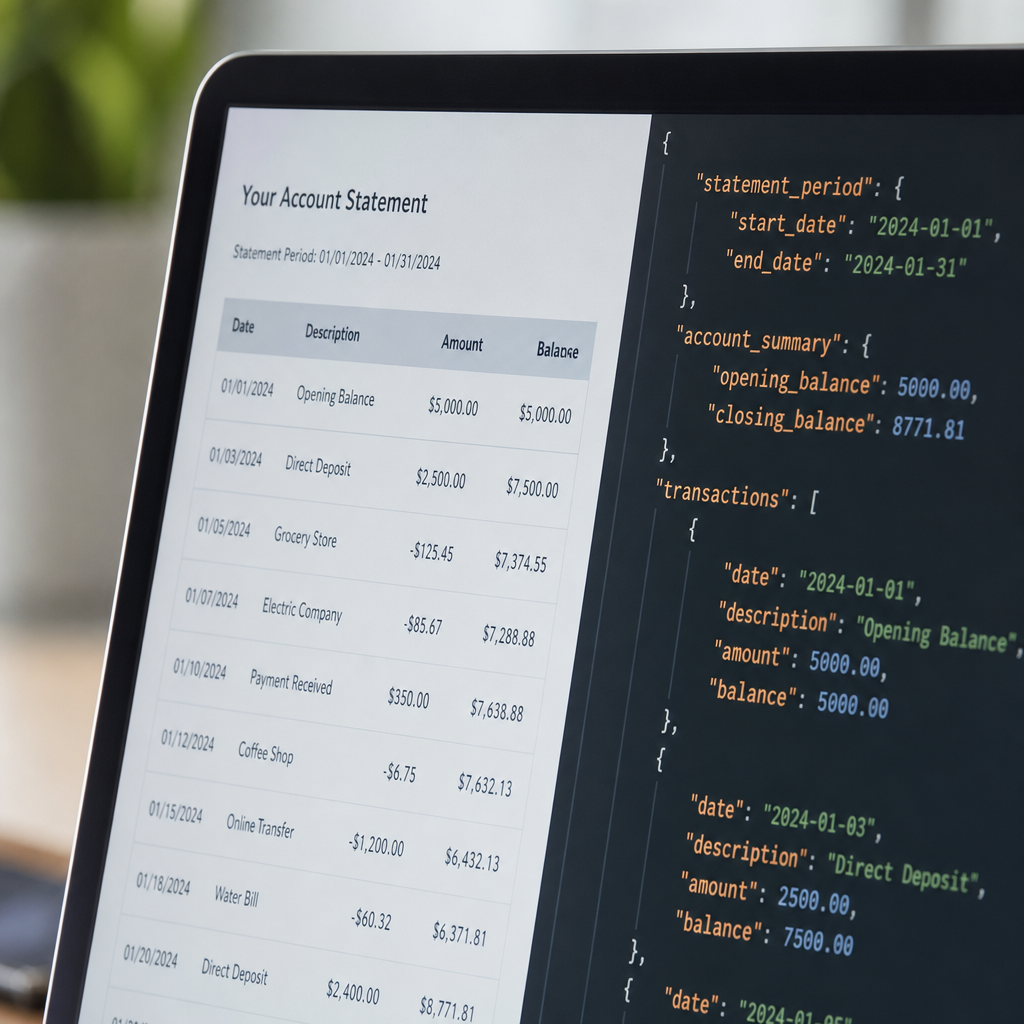
What a Well-Structured JSON Bank Statement Output Looks Like
When a bank statement is properly converted, the resulting JSON should organize data hierarchically rather than as one long flat list. A well-formed structure typically separates account details from the transaction array itself, like this:
{
  "account_holder": "Jane Doe",
  "bank_name": "Example National Bank",
  "statement_period": "2026-08-01 to 2026-08-31",
  "opening_balance": 4210.55,
  "closing_balance": 3872.10,
  "transactions": [
    {
      "date": "2026-08-03",
      "description": "Office Supplies Co.",
      "amount": -125.40,
      "type": "debit",
      "balance_after": 4085.15
    },
    {
      "date": "2026-08-05",
      "description": "Client Payment - Invoice 1042",
      "amount": 1500.00,
      "type": "credit",
      "balance_after": 5585.15
    }
  ]
}
This structure makes it trivial to feed the data into a Python script, a Node.js application, or a no-code automation platform. Every transaction is a discrete object with clearly labeled fields — no ambiguity about what each number represents.
JSON vs. CSV vs. Excel: Which Format Should You Actually Use?
Not every workflow needs JSON. If you're handing data to a bookkeeper who lives in spreadsheets, Excel or CSV might still be the better choice. Understanding the tradeoffs helps you pick the right export format for the job.
| Format | Ideal Use Case | Pros | Cons |
|---|---|---|---|
| JSON | API integrations, developer workflows, custom apps | Nested structure, machine-readable, automation-friendly | Not human-friendly without a viewer |
| CSV | Quick imports into spreadsheets or legacy systems | Universally supported, simple | No support for nested data or metadata |
| Excel (XLSX) | Manual review, bookkeeping, client-facing reports | Familiar interface, supports formulas and formatting | Larger file size, less ideal for automation |
Many businesses actually need more than one format depending on the recipient. A freelance bookkeeper might export to Excel for a client review, while the same underlying data gets pushed to JSON for an internal reporting dashboard. This is why flexible converters that support multiple export formats — rather than locking you into one — tend to serve growing businesses better long term.
The Xero developer documentation and QuickBooks API reference both rely on structured JSON payloads for their integrations, which is another reason JSON has become the connective tissue between bank data and accounting platforms. If you're building any kind of automated bookkeeping pipeline, JSON is almost always the format sitting in the middle.
Step-by-Step: Converting a Bank Statement to JSON Accurately
Regardless of which tool you use, following a consistent process reduces errors and keeps your financial data trustworthy. Here's a practical workflow:
- Gather and verify your source PDFs. Confirm you have the full statement, not a partial export, and check that pages aren't missing or out of order.
- Choose a converter built for financial documents. General-purpose PDF-to-JSON tools often mishandle currency formatting, negative values, and multi-column layouts. A platform like Bank Statement Boss is purpose-built to recognize these financial-specific patterns.
- Upload and let AI extraction run. The system should automatically detect the bank's layout, extract transactions, and normalize dates and amounts.
- Review the structured output. Even the best AI tools benefit from a quick human check, especially for statements with unusual formatting, foreign currencies, or handwritten annotations.
- Export to JSON (or your preferred format). Confirm decimal precision, date formats (ISO 8601 is standard: YYYY-MM-DD), and that debits/credits are labeled consistently.
- Integrate or import the JSON into your target system. Whether that's a custom script, a data warehouse, or an accounting platform's API, test with a small batch first before running a full historical import.
Following this sequence consistently is what separates a one-off cleanup job from a repeatable, audit-ready process — something that matters a great deal if you're a bookkeeper managing multiple clients or a finance team handling monthly reconciliations.
Security Considerations When Converting Financial Documents
Bank statements are sensitive documents containing account numbers, balances, and personally identifiable information. Before uploading any statement to a third-party converter, it's worth confirming a few things:
- Encryption in transit and at rest. Files should be encrypted using industry-standard protocols both while uploading and while stored.
- Data retention policy. Understand how long the provider keeps your files and whether they're automatically deleted after processing.
- Compliance posture. Look for adherence to frameworks like SOC 2 or similar security standards, which signal a provider takes data handling seriously.
- Access controls. If you're on a team, check whether the platform supports role-based permissions so not everyone can view every client's data.
The Federal Trade Commission's data security guidance is a useful baseline for understanding what responsible handling of financial data should look like, even though it's written for businesses broadly rather than statement converters specifically. Any vendor you evaluate should be able to clearly answer questions about encryption, retention, and compliance without hedging.
This is an area where Bank Statement Boss has built its reputation — combining AI-powered extraction accuracy with secure handling practices designed specifically for financial documents, which matters enormously when you're processing statements on behalf of clients rather than just yourself.

Common Mistakes When Converting Bank Statements to JSON
Even with a capable tool, a few recurring mistakes can undermine the quality of your converted data:
- Ignoring inconsistent date formats. Statements from different countries or banks may use DD/MM/YYYY versus MM/DD/YYYY. Failing to normalize this creates silent errors in downstream reports.
- Overlooking multi-currency statements. If an account holds transactions in more than one currency, make sure your converter tags currency codes rather than assuming a single default.
- Skipping validation of running balances. A good converter should let you cross-check that the sum of transactions matches the stated opening and closing balances — a simple but powerful accuracy check.
- Using a generic PDF tool instead of a finance-specific one. General OCR tools aren't trained to recognize bank-specific layouts, which increases the odds of misread columns.
- Failing to test the JSON schema against your target system. Before a full-scale import, validate that your accounting platform or database expects the same field names and structure your converter outputs.
Avoiding these pitfalls is largely about choosing the right tool from the outset and building a brief review step into your workflow, rather than trying to catch errors after they've already propagated into your books.
Who Actually Needs Bank Statement to JSON Conversion?
While spreadsheets remain the default for most small business bookkeeping, JSON conversion tends to matter most for:
- Bookkeepers and accounting firms building internal automation to reduce manual reconciliation across dozens of clients
- Fintech and finance software developers who need to ingest customer-provided statements into an app or platform
- Finance teams integrating bank data into internal dashboards, forecasting tools, or data warehouses
- Freelance accountants offering higher-value services by automating data collection instead of billing hours for manual entry
If your workflow is purely visual — reviewing a client's spending in a spreadsheet once a month — Excel or CSV may remain your primary format. But as soon as automation, APIs, or custom software enter the picture, JSON becomes the format that unlocks real efficiency gains.
Making the Switch to Automated Conversion
Transitioning from manual or semi-manual processes to automated conversion doesn't have to be an all-or-nothing decision. Many teams start by converting a single recurring client's statements or a specific reporting workflow, measure the time saved, and then expand from there. Given that research on small business operations consistently shows administrative overhead as one of the biggest drains on owner time, even modest automation wins can compound significantly over a fiscal year.
The practical starting point is simple: take a handful of your most recent statements, run them through a converter, and compare the output against your current manual process for both speed and accuracy. Most teams find the difference stark enough that the switch pays for itself within the first month.
Final Thoughts
Converting a bank statement to JSON isn't just a technical nicety — it's a foundational step for any business or accounting practice trying to reduce manual work, integrate financial data into modern software, and keep records audit-ready. Whether you're a developer building a finance app, a bookkeeper managing multiple clients, or a small business owner tired of retyping transaction data, choosing the right conversion approach determines whether you save hours or introduce new errors into your books.
Bank Statement Boss was built specifically to solve this problem — using AI-powered extraction to turn messy PDF statements into clean, structured data compatible with QuickBooks, Xero, Sage, and custom JSON workflows, all while maintaining secure handling of sensitive financial documents. If you're ready to stop copying numbers by hand and start working with data that's ready for your accounting stack from the moment it's exported, it's worth putting your next statement through the process and seeing the difference for yourself.
Article written by FrontRank