

Every bookkeeper, accountant, and small business owner eventually hits the same wall: a client or vendor sends a stack of PDF bank statements, and someone has to turn those static documents into usable, categorized data. The question isn't whether you need a solution — it's which solution actually works without creating more problems than it solves. This article compares three common approaches to digitizing bank statements: manual data entry, generic OCR tools, and purpose-built bank statement reader software, so you can decide which fits your workflow in 2026.
Why Bank Statement Data Extraction Is Still a Problem in 2026
You'd think that by now, every bank would offer clean, universally compatible exports. They don't. Banks across the globe still issue statements as PDFs — scanned images, multi-column layouts, inconsistent date formats, and transaction descriptions that vary wildly from one institution to another. According to the Consumer Financial Protection Bureau, there are thousands of federally regulated banks and credit unions in the United States alone, each with its own statement design. Multiply that by credit card issuers, international banks, and regional credit unions, and you get a data-formatting nightmare.
For accounting professionals, this isn't an abstract inconvenience. Reconciling transactions, preparing tax filings, and generating financial reports all depend on having clean, structured data. When that data is locked inside a PDF, the real work hasn't even started yet — someone still has to extract it.
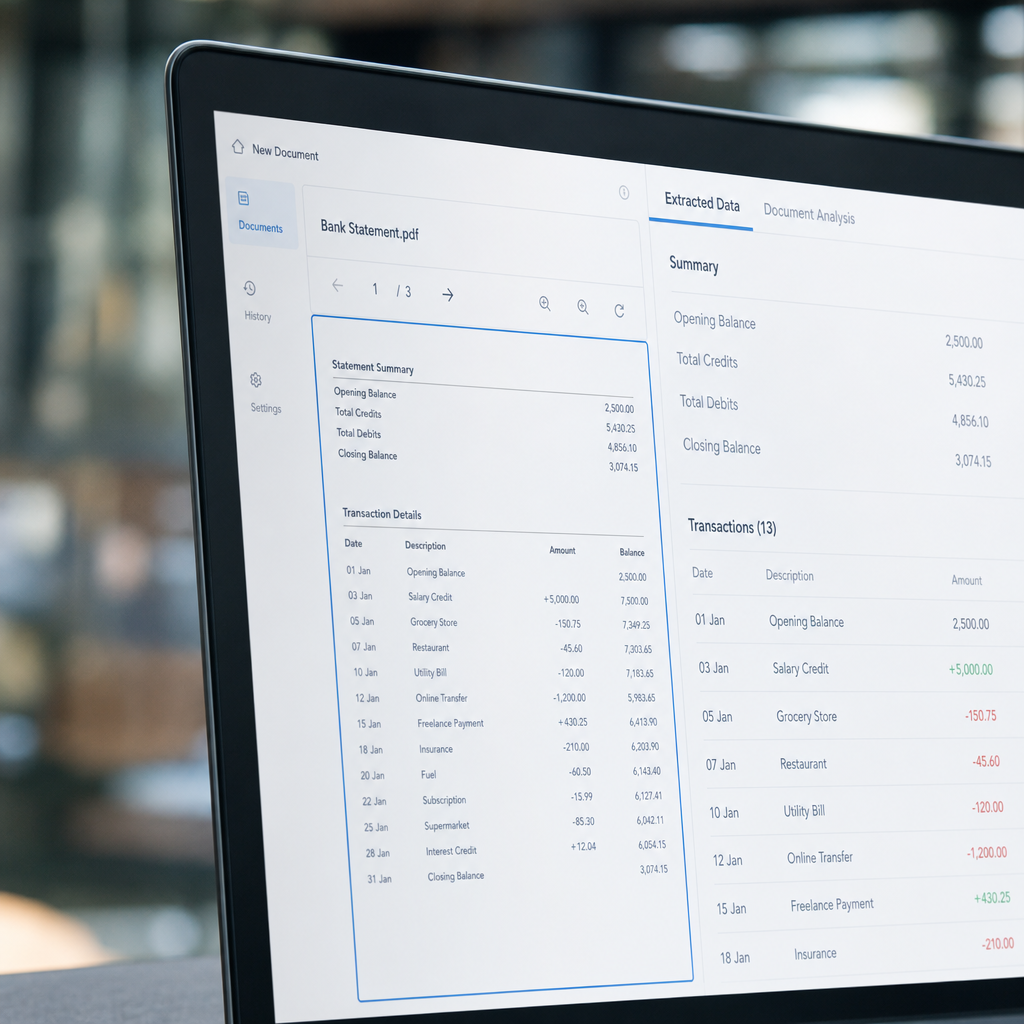
This is where bank statement reader software enters the picture. These tools are designed specifically to recognize the structure of financial documents — dates, descriptions, debits, credits, running balances — and convert them into spreadsheet-ready formats like CSV or XLSX. The best ones go a step further, formatting output to match the import requirements of platforms like QuickBooks, Xero, and Sage.
Manual Entry: The Default Nobody Should Default To
Manual entry remains the most common method simply because it requires no new tools or training. Someone opens the PDF, reads each line, and types the data into a spreadsheet or directly into accounting software. It's familiar, but it's also the slowest and most error-prone option available.
Problems with manual entry include:
- Time cost. A single multi-page statement can take 30-60 minutes to transcribe accurately, and bookkeepers handling multiple clients may process dozens of statements per week.
- Human error. Transposed digits, missed transactions, and misread dates are common, especially with low-quality scans.
- Burnout risk. Repetitive data entry is mentally draining work that pulls skilled professionals away from higher-value tasks like analysis and advisory services.
- Poor scalability. As a firm grows, manual entry simply cannot keep pace with client volume without proportional headcount increases.
The American Institute of CPAs has repeatedly flagged administrative overhead as one of the biggest drains on practice profitability, and manual statement transcription is a textbook example of low-value, high-effort work that eats into billable hours.
Generic OCR Tools: Better Than Nothing, Not Built for the Job
Optical character recognition (OCR) tools like general-purpose PDF converters can extract raw text from a document, but they weren't designed with financial statements in mind. They don't understand that "11/04/2026" in one column and "-245.00" in another represent a single transaction record. Instead, they often dump text in reading order, which breaks apart rows, merges columns, or scrambles multi-line descriptions.
Common generic OCR shortcomings include:
- Misaligned columns when statements use tables with inconsistent spacing
- Failure to distinguish between debits, credits, and balances
- No understanding of multi-page statement continuity
- Minimal or no formatting for accounting software import
- Inconsistent handling of scanned (image-based) PDFs versus digitally generated ones
Open-source libraries and tools referenced in developer communities like Stack Overflow are frequently used by technical teams to attempt custom extraction scripts, but these require ongoing maintenance as statement formats change, and they demand coding expertise most bookkeepers and small business owners simply don't have time to develop.
What Purpose-Built Bank Statement Reader Software Does Differently
Dedicated bank statement reader software is built around one job: understanding the structural logic of financial documents. Instead of just reading characters, these platforms are trained to recognize transaction patterns — date formats, amount columns, running balances, and multi-line merchant descriptions — regardless of which bank issued the statement.
Platforms like Bank Statement Boss use AI models specifically trained on financial document structures, which means they can process statements from hundreds of different banks without requiring custom templates for each one. The output isn't just extracted text — it's structured data, organized into clean rows and columns that map directly to the fields accounting software expects.
Key capabilities to look for in dedicated bank statement reader software:
- Automatic detection of transaction tables across varying bank layouts
- Support for both digital and scanned (image-based) PDFs
- Export formats compatible with QuickBooks, Xero, Sage, and Excel/CSV
- Batch processing for multiple statements or multiple clients at once
- Secure handling of sensitive financial data, including encryption in transit and at rest
- API access for firms that want to integrate conversion directly into their existing workflow
Side-by-Side Comparison: Manual Entry vs. Generic OCR vs. Dedicated Reader Software
| Factor | Manual Entry | Generic OCR Tools | Dedicated Bank Statement Reader Software |
|---|---|---|---|
| Speed | Very slow (30-60 min/statement) | Moderate, but requires cleanup | Fast (seconds to minutes per statement) |
| Accuracy | Prone to human error | Inconsistent, especially with scanned docs | High, built for financial layouts |
| Accounting software compatibility | Manual formatting required | Minimal to none | Built-in formatting for QuickBooks, Xero, Sage |
| Scalability | Poor | Limited without scripting | High, supports batch processing |
| Security controls | Depends on handler | Varies by tool | Encryption, access controls, audit trails |
| Learning curve | None | Moderate to high (for custom scripts) | Low, designed for non-technical users |
| Cost over time | High (labor hours) | Low upfront, hidden labor cost in cleanup | Subscription cost offset by time savings |
As the table shows, the trade-offs aren't just about speed — they touch accuracy, scalability, and total cost of ownership once labor hours are factored in.
How Much Time (and Money) Does Automated Extraction Actually Save?
Time savings are the most frequently cited benefit of switching to dedicated software, but it's worth quantifying. Consider a bookkeeper managing 15 small business clients, each submitting an average of 2 bank statements per month.
| Task | Manual Process | With Bank Statement Reader Software |
|---|---|---|
| Time per statement | 45 minutes | 2-3 minutes (including review) |
| Monthly statements processed | 30 | 30 |
| Total monthly hours spent | 22.5 hours | ~1.5 hours |
| Hours saved per month | — | ~21 hours |
| Approximate hours saved per year | — | 250+ hours |
Even at a conservative billable rate, reclaiming 250+ hours annually translates into either significant cost savings or, more strategically, additional capacity to take on new clients without hiring additional staff. This mirrors findings from broader workplace automation research published by organizations like McKinsey & Company, which has consistently found that administrative and document-processing tasks are among the most automatable functions in knowledge work.
Security and Compliance: A Non-Negotiable Requirement
Bank statements contain highly sensitive information — account numbers, transaction histories, and sometimes personally identifiable information tied to account holders. Any software handling this data needs to meet a high bar for security, not just convenience.
When evaluating bank statement reader software, finance professionals should confirm:
- Encryption standards. Data should be encrypted both in transit (TLS) and at rest.
- Data retention policies. Understand how long uploaded documents are stored and whether they're deleted after processing.
- Access controls. Role-based permissions matter for firms with multiple staff members handling different clients.
- Compliance alignment. Look for alignment with frameworks referenced by bodies like the National Institute of Standards and Technology, which publishes widely adopted cybersecurity guidelines relevant to financial data handling.
- Vendor transparency. Reputable providers publish clear privacy policies and are upfront about where data is processed and stored.
Bank Statement Boss addresses this directly by combining AI-powered extraction with secure data handling practices, which matters enormously for firms that are themselves bound by client confidentiality obligations or regulatory requirements.
Integration with Accounting Platforms: Why Formatting Matters More Than Extraction
Pulling data out of a PDF is only half the job. If the output doesn't match the import specifications of QuickBooks, Xero, or Sage, someone still has to manually reformat columns, rename headers, or adjust date formats before the data is usable. This is where many generic tools fall short — they treat "extraction" as the finish line when it's really just the midpoint.
Dedicated platforms solve this by offering export templates pre-formatted for specific accounting software. This typically includes:
- Correct column headers matching each platform's import expectations
- Standardized date formatting (avoiding regional mismatches like DD/MM vs. MM/DD)
- Properly signed debit/credit values
- Category or memo fields mapped where possible
- CSV or XLSX output tested against the platform's actual import tool
This formatting step is often the difference between a five-minute import and an afternoon of manual spreadsheet surgery. For firms juggling multiple clients on different platforms, having one tool that can output correctly for QuickBooks one day and Xero the next is a meaningful efficiency gain, which is part of why solutions like Bank Statement Boss build platform-specific formatting directly into their conversion process rather than leaving it to the user.

Who Benefits Most from Bank Statement Reader Software?
While any business handling financial documents can benefit, certain roles see outsized returns on adopting dedicated conversion tools:
- Freelance and independent bookkeepers managing multiple clients with varying bank formats, who need consistent output regardless of source.
- Small business owners who don't have dedicated accounting staff and need a fast way to get transaction data into their books.
- Accounting and CPA firms processing high volumes of client statements, particularly during tax season or month-end close cycles.
- Finance teams at growing companies reconciling multiple accounts or entities, where consistency and auditability matter.
- Loan underwriters and financial analysts who review bank statements as part of due diligence and need structured data for faster analysis.
Each of these groups shares a common need: converting unstructured financial documents into structured, trustworthy data as quickly and accurately as possible, without introducing security risk or requiring technical expertise.
Evaluating Your Options: Questions to Ask Before Choosing a Tool
Before committing to any bank statement reader software, it's worth running through a short evaluation checklist:
- Does it support the specific banks and statement formats you regularly encounter?
- Can it handle both digitally generated PDFs and scanned images?
- What accounting software formats does it export to natively?
- Is there a batch processing option for handling multiple statements at once?
- What security certifications or practices does the vendor disclose?
- Is API access available for teams wanting to automate the workflow further?
- What does pricing look like at scale — per document, per month, or tiered by volume?
Running through these questions helps separate tools that look good in a demo from tools that hold up under real, recurring workloads.
Final Thoughts: Choosing the Right Path Forward
Manual entry will always be an option, but it's an increasingly expensive one in terms of time, accuracy, and professional burnout. Generic OCR tools offer a partial improvement but still leave users with messy, unformatted output that requires significant manual cleanup. Purpose-built bank statement reader software closes that gap entirely — combining accurate, AI-driven extraction with formatting that's ready for QuickBooks, Xero, or Sage from the moment it's exported.
For small business owners, bookkeepers, and finance teams who process bank statements regularly, the choice increasingly comes down to how much time and accuracy they're willing to sacrifice by sticking with outdated methods. Bank Statement Boss was built specifically to close that gap, offering secure, AI-powered conversion with the formatting and API flexibility that modern accounting workflows demand. For anyone still transcribing statements by hand or wrestling with generic OCR output, making the switch is one of the simplest efficiency gains available in 2026.
Article written by FrontRank